
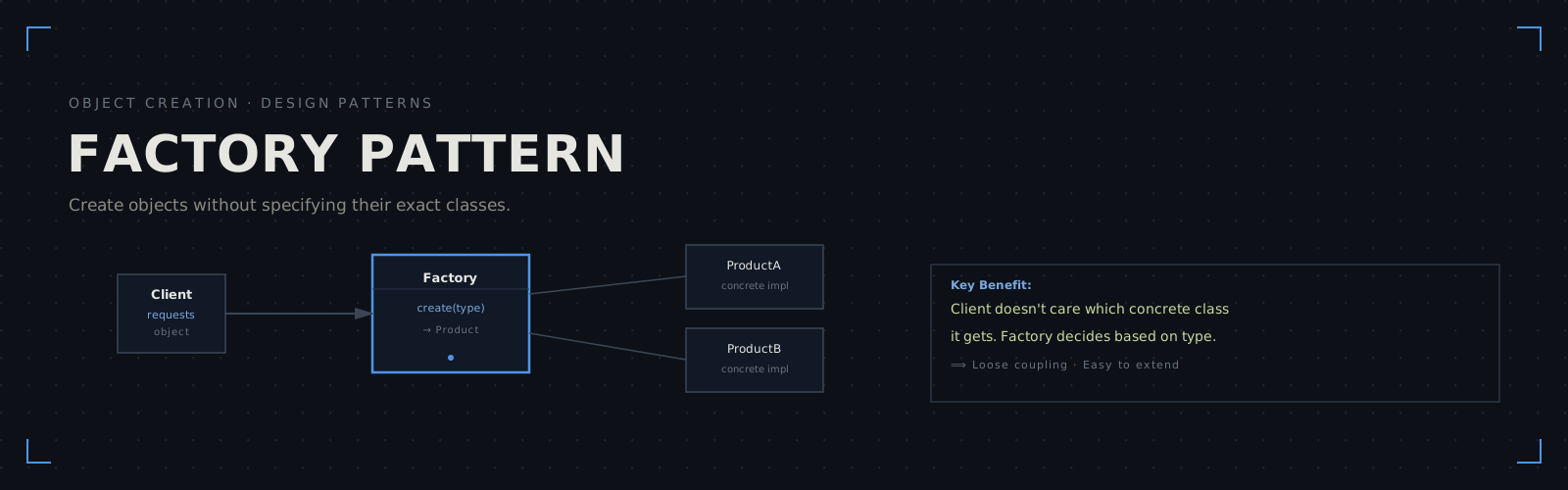
The Factory Pattern is a creational design pattern that provides a way to create objects without specifying their exact concrete classes. Instead of calling a constructor directly, you ask a factory to create an object for you based on a parameter or configuration logic.
The core benefit: your client code doesn’t need to know or care which concrete class it’s working with. If you add a new type later, you only modify the factory — not every place in the application that creates objects.
Why Use It?
Imagine you’re building a database connection library. Your users want to connect to different databases: PostgreSQL, MySQL, SQLite. Without a factory, your code is tightly coupled:
// ❌ Tightly coupled — client knows all concrete types
if (dbType == "postgres") {
  connection = new PostgresConnection();
} else if (dbType == "mysql") {
  connection = new MySqlConnection();
} else if (dbType == "sqlite") {
  connection = new SqliteConnection();
}
Every time you add a new database type, you have to update this if-else chain everywhere. That’s maintenance hell.
With a factory, the client delegates creation to a single place:
// ✓ Decoupled — client just asks the factory
connection = DatabaseFactory::create("postgres");
Clean. Scalable. Testable. The logic for “how do I create a PostgreSQL connection?” is encapsulated in one place.
Interactive Implementation Across Languages
Compare how to implement the Factory Pattern across C++, Python, JavaScript, and Java:
// Base class (interface)
class DatabaseConnection {
public:
  virtual ~DatabaseConnection() = default;
  virtual void connect() = 0;
  virtual void query(const std::string& sql) = 0;
};

// Concrete implementations
class PostgresConnection : public DatabaseConnection {
public:
  void connect() override { std::cout << "Connecting to PostgreSQL\n"; }
  void query(const std::string& sql) override {
      std::cout << "Executing on Postgres: " << sql << "\n";
  }
};

class MySqlConnection : public DatabaseConnection {
public:
  void connect() override { std::cout << "Connecting to MySQL\n"; }
  void query(const std::string& sql) override {
      std::cout << "Executing on MySQL: " << sql << "\n";
  }
};

class SqliteConnection : public DatabaseConnection {
public:
  void connect() override { std::cout << "Connecting to SQLite\n"; }
  void query(const std::string& sql) override {
      std::cout << "Executing on SQLite: " << sql << "\n";
  }
};

// THE FACTORY
class DatabaseFactory {
public:
  static std::unique_ptr<DatabaseConnection> create(
      const std::string& type
  ) {
      if (type == "postgres") {
          return std::make_unique<PostgresConnection>();
      } else if (type == "mysql") {
          return std::make_unique<MySqlConnection>();
      } else if (type == "sqlite") {
          return std::make_unique<SqliteConnection>();
      }
      throw std::invalid_argument("Unknown database type: " + type);
  }
};

// CLIENT CODE
int main() {
  auto db = DatabaseFactory::create("postgres");
  db->connect();
  db->query("SELECT * FROM users");

  auto db2 = DatabaseFactory::create("mysql");
  db2->connect();
  db2->query("INSERT INTO logs VALUES (...)");
}from abc import ABC, abstractmethod
# Base class (interface)
class DatabaseConnection(ABC):
@abstractmethod
def connect(self):
pass
@abstractmethod
def query(self, sql):
pass
# Concrete implementations
class PostgresConnection(DatabaseConnection):
def connect(self):
print("Connecting to PostgreSQL")
def query(self, sql):
print(f"Executing on Postgres: {sql}")
class MySqlConnection(DatabaseConnection):
def connect(self):
print("Connecting to MySQL")
def query(self, sql):
print(f"Executing on MySQL: {sql}")
class SqliteConnection(DatabaseConnection):
def connect(self):
print("Connecting to SQLite")
def query(self, sql):
print(f"Executing on SQLite: {sql}")
# THE FACTORY
class DatabaseFactory:
_types = {
"postgres": PostgresConnection,
"mysql": MySqlConnection,
"sqlite": SqliteConnection,
}
@staticmethod
def create(db_type):
if db_type not in DatabaseFactory._types:
raise ValueError(f"Unknown database type: {db_type}")
return DatabaseFactory._types[db_type]()
# CLIENT CODE
if __name__ == "__main__":
db = DatabaseFactory.create("postgres")
db.connect()
db.query("SELECT * FROM users")
db2 = DatabaseFactory.create("mysql")
db2.connect()
db2.query("INSERT INTO logs VALUES (...)")// Base class
class DatabaseConnection {
connect() {
throw new Error("connect() must be implemented");
}
query(sql) {
throw new Error("query() must be implemented");
}
}
// Concrete implementations
class PostgresConnection extends DatabaseConnection {
connect() {
console.log("Connecting to PostgreSQL");
}
query(sql) {
console.log(`Executing on Postgres: ${sql}`);
}
}
class MySqlConnection extends DatabaseConnection {
connect() {
console.log("Connecting to MySQL");
}
query(sql) {
console.log(`Executing on MySQL: ${sql}`);
}
}
class SqliteConnection extends DatabaseConnection {
connect() {
console.log("Connecting to SQLite");
}
query(sql) {
console.log(`Executing on SQLite: ${sql}`);
}
}
// THE FACTORY
class DatabaseFactory {
static create(type) {
switch (type) {
case "postgres":
return new PostgresConnection();
case "mysql":
return new MySqlConnection();
case "sqlite":
return new SqliteConnection();
default:
throw new Error(`Unknown database type: ${type}`);
}
}
}
// CLIENT CODE
const db = DatabaseFactory.create("postgres");
db.connect();
db.query("SELECT * FROM users");
const db2 = DatabaseFactory.create("mysql");
db2.connect();
db2.query("INSERT INTO logs VALUES (...)");// Interface
public interface DatabaseConnection {
void connect();
void query(String sql);
}
// Concrete implementations
public class PostgresConnection implements DatabaseConnection {
@Override
public void connect() {
System.out.println("Connecting to PostgreSQL");
}
@Override
public void query(String sql) {
System.out.println("Executing on Postgres: " + sql);
}
}
public class MySqlConnection implements DatabaseConnection {
@Override
public void connect() {
System.out.println("Connecting to MySQL");
}
@Override
public void query(String sql) {
System.out.println("Executing on MySQL: " + sql);
}
}
public class SqliteConnection implements DatabaseConnection {
@Override
public void connect() {
System.out.println("Connecting to SQLite");
}
@Override
public void query(String sql) {
System.out.println("Executing on SQLite: " + sql);
}
}
// THE FACTORY
public class DatabaseFactory {
public static DatabaseConnection create(String type) {
switch (type) {
case "postgres":
return new PostgresConnection();
case "mysql":
return new MySqlConnection();
case "sqlite":
return new SqliteConnection();
default:
throw new IllegalArgumentException(
"Unknown database type: " + type
);
}
}
}
// CLIENT CODE
public class Main {
public static void main(String[] args) {
DatabaseConnection db = DatabaseFactory.create("postgres");
db.connect();
db.query("SELECT * FROM users");
DatabaseConnection db2 = DatabaseFactory.create("mysql");
db2.connect();
db2.query("INSERT INTO logs VALUES (...)");
}
}Key Takeaways
- Decoupling: Client code doesn’t depend on concrete classes, only the factory interface.
- Extensibility: Want to add a new database type? Just create a new class and register it in the factory. Zero client code changes.
- Single Responsibility: All object creation logic lives in one place — the factory.
- Testability: Mock the factory or swap implementations for testing without touching client code.
When NOT to Use the Factory Pattern
The factory pattern isn’t a silver bullet. Avoid it when:
- You only have one or two concrete types that never change. A simple
if-elseor direct constructor is clearer. - Object creation is so complex it needs a builder pattern.
- You’re dealing with simple value objects without polymorphism.